Step 5: Certify
Description
Use this procedure to certify the data submitted in Steps 1 through 4.
By completing this step, you will be certifying that you have reviewed the Annual Financial Report (AFR) which has been submitted for your Charter School, School District, or Education Service Center for completeness and accuracy. It is critical that the AFR PDF is correct and complete. Incorrect information could affect your district's FIRST Rating and/or your State Funding.
To certify your Annual Financial Report submission, all statements must be completed. By marking Yes below, you certify that the statement is true.
Important: CPA Personnel are not authorized to complete these steps. Only authorized school personnel should complete these steps.
Follow Up Activities
- For information about reviewing the status of your submission, go to the View District Status topic.
- For information about reopening the AFR submission, go to the Reopen Process topic.
Procedure
- On the Step 5: Certify page, select Yes or N/A as needed for each section.
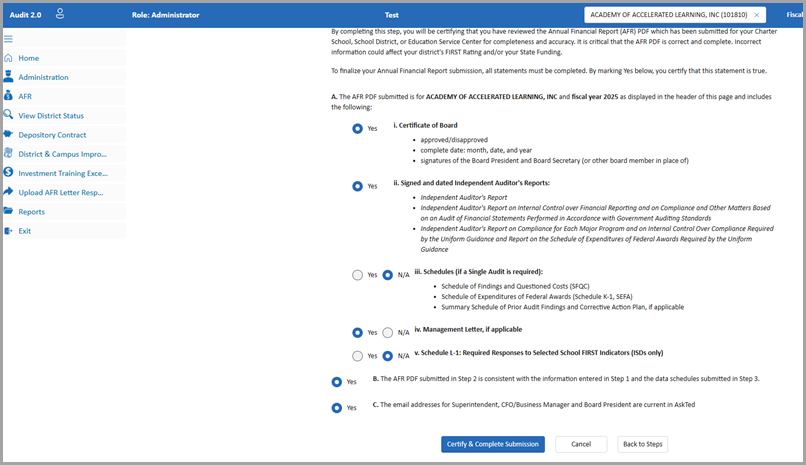
- Click Certify & Complete Submission.
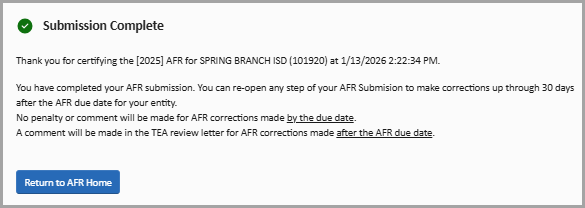
- Review the Submission Complete dialog box. Then click Return to AFR Home.
See Also: Reopen Process